I have been working on an idea for a while now. Using web services which had come in in NAV2009 - I wanted to create a simple web portal which would allow customers to login, view their sales orders, view their invoices, view/download their statement and update their own records.
With out spending too much time on this. I downloaded a free stylesheet (css).
Using basic .NET membership I was able to create those things.
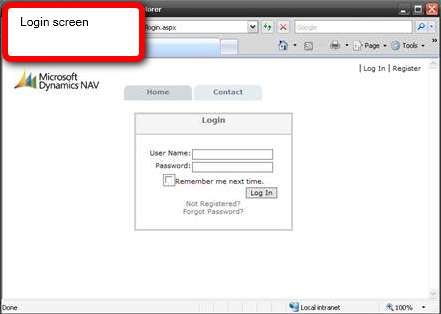
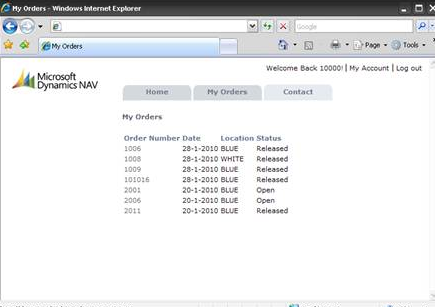
With going into too much detail. Here are some screenshots.
I found this link useful to upskill on .NET membership controls etc.
Microsoft - Membership and Login Controls
There is a lot of info on the web. Just google/bing ".NET membership".
Here is some code to list orders for a particular customer.
Final words
I am not here to try and give out a solution. I am just trying to get the idea that anything is possible with web services. It opens up so many doors.
For end customers, you will need the External Connector for this. There is currently a promotion going on for existing customers.
With out spending too much time on this. I downloaded a free stylesheet (css).
Using basic .NET membership I was able to create those things.
With going into too much detail. Here are some screenshots.


I found this link useful to upskill on .NET membership controls etc.
Microsoft - Membership and Login Controls
There is a lot of info on the web. Just google/bing ".NET membership".
Here is some code to list orders for a particular customer.
using System;
using System.Data;
using System.Collections.Generic;
using System.Configuration;
using System.Collections;
using System.Web;
using System.Web.Security;
using System.Web.UI;
using System.Web.UI.WebControls;
using System.Web.UI.WebControls.WebParts;
using System.Web.UI.HtmlControls;

public partial class OrderList : System.Web.UI.Page
{
    protected void Page_Load(object sender, EventArgs e)
    {
        if (Page.User.Identity.IsAuthenticated)
        {

            SalesOrder_Service service = new SalesOrder_Service();
            service.UseDefaultCredentials = true;

            SalesOrder_Filter filter = new SalesOrder_Filter();
            filter.Field = SalesOrder_Fields.Sell_to_Customer_No;
            filter.Criteria = Utility.GetUserName();

            SalesOrder_Filter filter2 = new SalesOrder_Filter();
            filter2.Field = SalesOrder_Fields.Status;
            filter2.Criteria = "Released";

            SalesOrder[] salesOrders = service.ReadMultiple(new SalesOrder_Filter[] { filter, filter2 }, null, 0);

            rptMyOrders.DataSource = salesOrders;
            rptMyOrders.DataBind();
        }
    }
}
Final words
I am not here to try and give out a solution. I am just trying to get the idea that anything is possible with web services. It opens up so many doors.
For end customers, you will need the External Connector for this. There is currently a promotion going on for existing customers.