Technical dive into the Mobile Platform in Update 10

With the recent Platform update 10 they introduced server side coding and made some enhancements to the mobile platform. This brings a lot of flexibility and capabilities. Below I will focus on just the Expense Management Mobile workspace.

For one, the Mobile workspaces are now embedded in the AOT as a resource file. Notice how it says “In metadata”. This indicates that it has loaded from the AOT. I think this is a good move. Its all about ALM. This is also great to keep the server side and client side in sync.

image

The nice thing is that the Expense Mobile solution is in its own model. Makes it easy for us to track and learn from.

The main entry is the workspace resource file xml. Notice the guid, this is important for doing some server side coding.

image

Now lets take a look at the workspace class. You will notice the same guid is used for the class attribute.

image

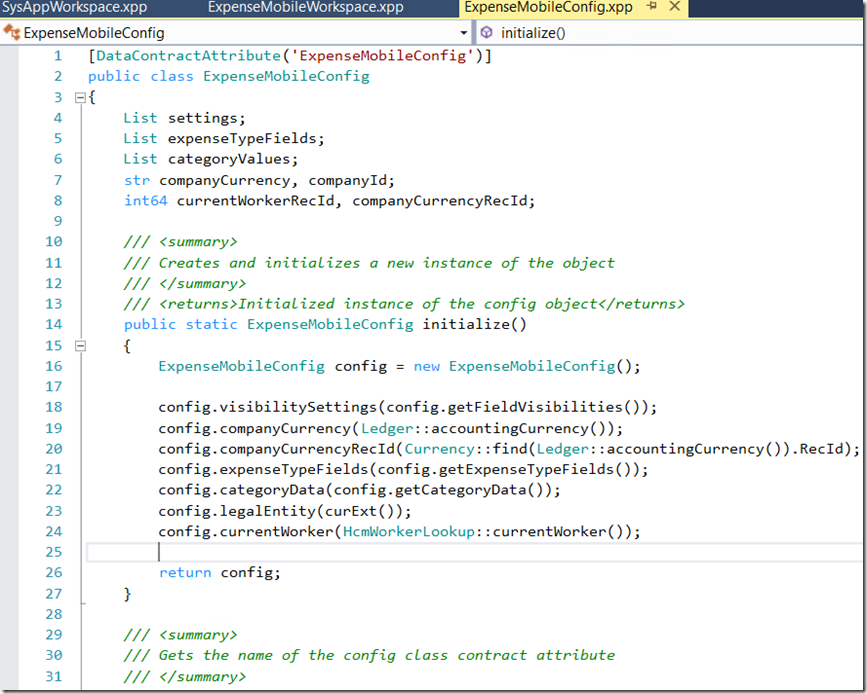
in one of my prior posts, I mentioned that the currency field wasn’t being defaulted when entering a new expense. Now with server side coding you can achieve some of these things.

Below is a default config contract class. It is triggered from the above class. You can add as many contract classes as you like. See line 20 and 21 in the above screenshot.
image

If you look at the js file embedded in the workspace xml. You will notice that it loads the config contract onto the client side. Allowing it to work client side and not requiring a connection to the server.

image

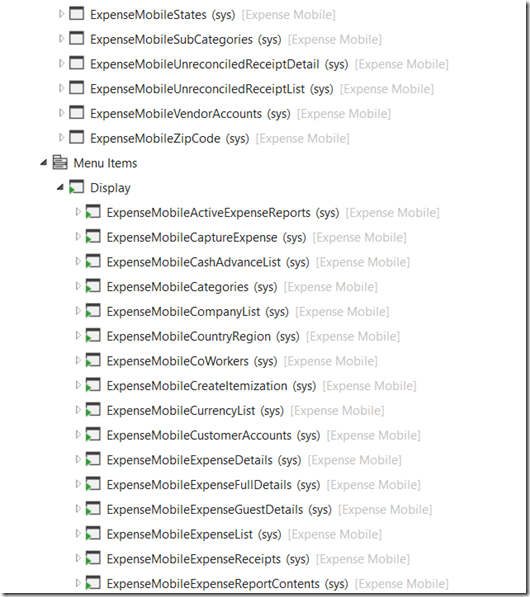
The other things you will notice is that there are a number of forms created just for the mobile solution. Below are screenshots of the whole model. Its not that big but there has been substantial work done to get to this point.

Below are some screenshot for my own reference. I know I will refer to to it in the future.

image

image

image

image

Refer to Mobile Platform landing page for more information.

https://docs.microsoft.com/en-us/dynamics365/unified-operations/dev-itpro/mobile-apps/platform/mobile-platform-home-page

Popular posts from this blog

Approve Workflow via email using template placeholders #Dyn365FO

Dynamics 365 for Finance and Operations has placeholders which can be inserted into the instructions. Normally you would want this to show up in the email that is sent. One of the most useful ones is the URL link to the exact record that you are approving. In the workflow configurations use the placeholder and build up your message. Towards the end it has workflow specific ones. The URL token is %Workflow.Link to web% . For the technical people the token is replaced in this class WorkflowDocumentField. This is what I inserted into my email template. <BODY> subject: %subject% <BR> message: %message% <BR> company: %company% <BR> for: %for% <BR> </BODY> Should look like this. The final result looks like this. If you debug these are the place holders that are put together.

AX - How to use Set and SetEnumerator

The Set class is used for the storage and retrieval of data from a collection in which the values of the elements contained are unique and serve as the key values according to which the data is automatically ordered. You can create a set of primitive data types or complex data types such as a Class, Record or Container. Below is sample of a set of records. static void _Set(Args _args) {     CustTable       custTable;     Set             set = new Set(Types::Record);     SetEnumerator   setEnumerator;     ;     while select custTable     {         if (custTable && !set.in(custTable))         {             set.add(custTable);         }     }     if (!set.empty())     {    ...

Purchase requisition – Price

The price fields on the purchase requisition are non-editable for catalogue items. It is expected that a trade agreement be created. The price fields are only editable for these conditions: Form is opened view AP -> Periodic -> Purchase Requisition -> All purchase requisition, or Line type is “Non-catalogue item”, or User is task owner. Ie. The task is assigned to the user. In other words he/she maybe the purchaser that gets the price. User is approval owner. Ie. The approval is assigned to the user. In other words he/she maybe the manager that approves the final requisition. For catalogue items on the purchase requisition line can only select between the vendor directly associated with the item and the cheapest vendor as found through the purchase price trade agreements. If another vendor is requested the vendor can be blanked and the user can enter a “Proposed vendor” in the proposed vendor field on the general tab page for the purchase requisition line.   NOTE: ...